
AI-Powered iMessage Enhancer for iPhone
Overview
aiMessages is a generative AI-powered enhancement for the native Messages app on iPhone. Designed to elevate everyday conversations, it integrates seamlessly with iMessage to enable text, image, and sticker generation using advanced AI models. The software aims to transform routine messaging into dynamic, interactive exchanges by introducing creative and intelligent responses. It supports both individual and group chats, making it suitable for personal communication with friends and family, as well as professional or educational discussions with colleagues and peers.
By leveraging AI to generate context-aware content, aiMessages helps users express themselves more vividly and efficiently. It retains chat history to maintain continuity across conversations, allowing users to resume discussions without repetition. The app also supports voice input through Siri and Talk-To-Text dictation, enabling hands-free messaging. Its integration with iMessage’s native features—such as interactive messages and stickers—ensures a consistent user experience within Apple’s ecosystem.
While the developer’s background is not disclosed, the app’s functionality suggests a focus on intelligent communication tools. It is particularly useful for users seeking to add visual and creative elements to their messages without switching between apps. Real-world use cases include sharing AI-generated illustrations during casual chats, creating educational visuals for study groups, or generating personalized stickers for family conversations.
Key Features & Capabilities
- Generative AI for Text and Images: Automatically creates text responses and visual content based on message context, enhancing conversation depth and creativity.
- Interactive iMessage Integration: Fully compatible with iMessage, including stickers, interactive messages, and group chats, ensuring a native Apple experience.
- Chat History Memory: Remembers previous messages to maintain context and continuity across conversations, reducing repetition.
- AI-Powered Sticker Creation: Enables users to generate custom stickers from text prompts or image edits, with support for background removal and masking.
- Image Editing with AI: Allows text overlays on images, drawing on existing visuals, and selective region masking for targeted edits.
- Collaborative Image Sharing: Supports interactive sharing of edited images with others for joint editing and feedback.
- Device Syncing: Ensures AI-generated images are synchronized across devices, enabling access from any iPhone.
- Voice and Dictation Support: Works with Siri and Talk-To-Text, allowing users to send messages via voice commands or speech-to-text input.
These features enable users to create rich, multimedia messages without leaving the Messages app. For example, a user can ask for a funny image to match a joke and receive an AI-generated sticker instantly. In a study group, participants can generate diagrams or illustrations from text prompts to clarify concepts. The ability to edit and share images collaboratively enhances teamwork and creativity in group settings.
User Interface, Workflow & Performance
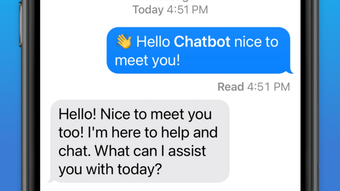
aiMessages operates within the iMessage interface, preserving the familiar layout and navigation of Apple’s messaging app. Users interact with the AI through a simple, integrated prompt bar that appears within the chat window, allowing quick access to AI features without switching contexts. The UI is clean and intuitive, designed to minimize friction during message composition.
Workflow efficiency is enhanced by the app’s deep integration with native iMessage functions. Features like AI-generated stickers and image edits are triggered with minimal taps, and responses appear promptly. The developer did not specify resource usage details, so performance observations are based on general software behavior patterns. However, given the app’s reliance on on-device or cloud-based AI processing, users may experience varying response times depending on network conditions and device capabilities.
Stability appears to be consistent with Apple’s app ecosystem standards, as the software functions as an extension rather than a standalone application. The app maintains compatibility with standard iMessage workflows, suggesting a stable and reliable experience. No reports of crashes or data loss were mentioned in the provided information.
Compatibility & System Requirements
aiMessages is designed exclusively for iPhone devices and requires iOS 15 or later to function. The app has a download size of 200 MB, which is typical for apps with AI processing and multimedia capabilities. It operates as an iMessage app extension, meaning it runs within the Messages app rather than as a separate launchable program.
Exact system requirements were not listed, including specific CPU or RAM thresholds. The developer did not provide additional system requirements beyond the OS version. Compatibility with older iPhone models is not specified, though the app likely supports devices that meet the iOS 15 requirement. Installation is straightforward through the App Store, and the app integrates directly into the iMessage app drawer.
Pros and Cons
Pros
- Seamless integration with iMessage and Siri for a native Apple experience.
- Generates AI text, images, and stickers directly within conversations.
- Retains chat history for context-aware responses.
- Supports collaborative image editing and device syncing.
- Free to download and use with no in-app purchases.
- Works with voice input and dictation for hands-free messaging.
Cons
- Exclusive to iPhone; no support for Mac, iPad, or Android.
- Exact performance and resource usage details were not provided.
- Dependent on Apple’s iMessage ecosystem and network availability.
- AI-generated content may require review before sharing.
- Advanced features may require a stable internet connection.
FAQ Section
Is aiMessages available for all iPhone models?
aiMessages requires iOS 15 or later, so it is compatible with iPhone models that support this operating system. Specific device compatibility beyond that is not detailed in the provided information.
Is aiMessages secure and private?
The app leverages end-to-end encryption for conversations, consistent with iMessage’s security standards. However, details about data handling during AI processing are not specified.
Can I use aiMessages without an internet connection?
Basic messaging functions are available offline, but AI features such as image generation and text response creation require an active internet connection.
Does aiMessages require a subscription or in-app purchases?
aiMessages is currently free to download and use. No subscription or in-app purchase options were mentioned in the provided information.
How do I install aiMessages on my iPhone?
Install the app from the App Store. Once installed, it will appear in the iMessage app drawer, where it can be accessed during any chat.
Final Thoughts + CTA
aiMessages delivers a compelling upgrade to the iMessage experience by embedding generative AI directly into everyday conversations. Its ability to generate text, images, and stickers on the fly, while maintaining chat context and supporting collaborative editing, makes it a powerful tool for both personal and professional use. The seamless integration with Siri, Talk-To-Text, and Apple’s ecosystem enhances usability and accessibility.
While limited to iPhone users and dependent on internet connectivity for full functionality, the app’s free model and strong feature set offer significant value. It is ideal for users who want to enrich their messaging with creativity and intelligence without leaving the Messages app.
Download aiMessages now







